

Introduction
Roblox players who enjoy tweaking how their favourite games behave often look for a script executor, and Fluxus has been one of the names that keeps coming up in that conversation for years. It is a tool that lets you run community-made Lua scripts inside Roblox games, which can automate repetitive tasks, change how the interface looks, or add features the base game never offered.
What draws many people to Fluxus is the balance it tries to strike: it works on desktop and on phones, it costs nothing to start with, and its layout does not demand technical knowledge before you can run your first script. This guide walks through what Fluxus actually does, how to set it up on each supported platform, how its key system works, and the honest limitations you should know before installing anything of this kind.
A quick word of caution up front, because it matters more than any feature list: running any executor goes against Roblox’s Terms of Service, and it can lead to warnings, suspensions, or a permanent ban on the account you use. Nothing in this guide can remove that risk, and no executor can promise otherwise. If you decide to experiment, use a spare account you can afford to lose, and only ever get the software from its official source.
What Is Fluxus Executor
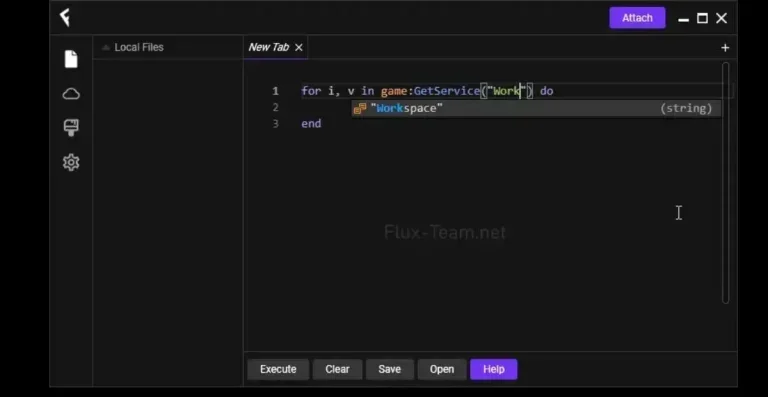
Fluxus Executor is a Roblox script executor — a separate program that attaches to the Roblox client while a game is running and feeds it Lua scripts written by other players. Lua is the same scripting language Roblox itself is built around, which is why these scripts can interact with game mechanics so directly: they can automate grinding, reveal information on screen, move a character automatically, or reshape parts of the interface.
The tool has been around long enough to build a large following, particularly among Android players, where a capable executor that does not require a rooted phone has always been in demand. Fluxus does not ask you to root your Android device, and its Windows and Linux builds give desktop players a route in as well. It ships with a built-in script editor and a browsable collection of community scripts, so you are not forced to hunt the internet for your first script — though you should still be picky about which scripts you trust, since a script written by a stranger can do things you did not expect.
One design choice worth understanding early: Fluxus only touches what happens on your own device. It cannot change server-side data, so it will not add currency to your account balance or unlock paid items on Roblox’s servers. Anyone promising that is selling you a scam, not a script.
Why Choose Fluxus Executor — and the Honest Safety Picture
There are plenty of executors competing for attention, so why does Fluxus keep its audience? The most common reasons are practical rather than flashy: it is free to start, it covers both mobile and desktop, it is updated regularly to keep pace with Roblox’s own updates, and its interface is approachable for someone running a script for the first time.
The safety picture needs the same honesty. Fluxus itself is widely reported as clean when obtained from its official source — but that sentence comes with two large caveats. First, the internet is full of fake Fluxus downloads bundled with malware, keyloggers, or password stealers; the single most dangerous step in this whole process is downloading from the wrong site. Second, even a genuine copy carries account risk: Roblox’s anti-cheat systems detect injected code, and detection methods change constantly, so there is no way to guarantee your account stays safe. Treat every executor session as a calculated risk, never run one on your main account, and never disable your antivirus system-wide — if your security software flags the file, add a narrow exception for that one file only after you are confident about where it came from, or do not proceed at all.
Also worth knowing: your antivirus flagging an executor is not, by itself, proof of malware. Executors inject code into another program’s memory, which is behaviour security software is designed to treat as suspicious. That does not make the flag safe to ignore, either — it means you should verify the source carefully rather than blindly trusting or blindly dismissing the warning.
How to Download Fluxus Executor
The steps below describe the process once you reach the official source.
For Windows
- Visit the official Fluxus website from your browser.
- Choose the Windows build from the download options.
- Wait for the file to finish downloading, then locate it in your downloads folder.
- If your browser or antivirus warns about the file, pause and double-check that you are on the genuine official site before continuing.
For Android
- Visit the official Fluxus website from your phone’s browser.
- Choose the Android build to get the APK file.
- Before installing, open your phone’s settings and allow installation from your browser, since the APK does not come from the Play Store.
- Keep the downloaded APK file somewhere you can find it again, in case you need to reinstall after an update.
For Linux
- Visit the official Fluxus website from your Linux machine.
- Choose the Linux build and download it.
- Follow the on-screen instructions provided with that build to prepare it for use on your distribution.
How to Install Fluxus Executor
On Windows
- Run the downloaded installer or executable and allow it through any permission prompt.
- Let the installation finish, then launch Fluxus from your desktop or start menu.
- If your antivirus quarantines a component, restore only the file you verified came from the official source, and consider a file-specific exception rather than switching protection off entirely.
On Android
- Open the downloaded APK file and confirm the installation prompt.
- If Android blocks the install, enable “Install unknown apps” for your browser only, then retry — you can turn that permission back off afterwards.
- Open Fluxus once installed and grant only the permissions it genuinely needs to function.
On Linux
- Open the downloaded package and follow the setup steps shown for your distribution.
- Launch Fluxus and confirm it opens cleanly before connecting it to Roblox.
How to Use Fluxus Executor / Execute Scripts
- Make sure Roblox is installed and updated on the same device.
- Open Fluxus first, then launch Roblox and join the game you want to play.
- Inside the game, open the Fluxus overlay or window and attach it to the running game session.
- Paste the script you want to run into the built-in editor, or pick one from the built-in script collection.
- Press the Execute button and watch for the script’s own interface or confirmation inside the game.
- If nothing happens, check that Fluxus is properly attached and that the script is still maintained for the current version of the game — outdated scripts are the most common cause of silent failures.
A note on scripts: never paste in a script you have not at least skimmed, and never run a script that asks you to enter your Roblox password or any login detail anywhere outside Roblox itself. Legitimate scripts do not need your credentials.
How to Get the Fluxus Key
Fluxus uses a key system for its free tier. The key is free, but it only lasts 24 hours, after which you repeat the process. A paid option that skips the key step is also reported to exist.
- Open Fluxus after installation and look for the Get Key button.
- Tap or click it — a verification link is prepared for you.
- Open that link in your browser and work through the short verification pages, without skipping steps, until your key is displayed.
- Copy the key exactly as shown.
- Paste it back into Fluxus and confirm.
- Once the key is accepted, you can attach Fluxus to a game and run scripts until the key expires.
If the key page fails to load or loops endlessly, try a different browser, disable any aggressive ad blocker for that page, and make sure your connection is stable before starting over. Keys are time-sensitive, so do not leave a long gap between generating one and pasting it in.
Features
- Free core access — the main executor costs nothing; an optional paid tier removes the daily key step.
- Windows, Android, and Linux support — one tool that follows you across desktop and mobile.
- Built-in script editor — write and adjust scripts with syntax highlighting and quick error feedback.
- Built-in script collection — browse community scripts from inside the app instead of searching forums.
- No root required on Android — works on standard, non-rooted phones.
- Lightweight footprint — modest storage and memory demands compared with running a full game client.
- Regular updates — the developers aim to restore compatibility quickly after Roblox updates.
- In-game overlay — adjust and re-run scripts without restarting the game.
- Broad game coverage — works with a wide range of popular Roblox titles, from farming simulators to role-playing games.
What’s New in Latest Version
The latest version number could not be verified from a reliable official source at the time of writing, so no specific version or changelog claims are made here. Sources agree in general terms that recent development has focused on keeping the executor working after Roblox client updates and on maintaining the script collection, but the owner should update this section once an official changelog is confirmed.
System Requirements
| Platform | OS | Processor | RAM | Storage | Root / Jailbreak |
|---|---|---|---|---|---|
| Windows | Windows 7 or newer | Dual-core, 2.0 GHz or better | 2 GB minimum (4 GB recommended) | 200 MB free | Not applicable |
| Android | Android 7.0 or newer | Dual-core, 2.0 GHz or better | 2 GB minimum (4 GB recommended) | 200 MB free | No root required |
| Linux | Linux (distribution build) | Dual-core, 2.0 GHz or better | 2 GB minimum (4 GB recommended) | 200 MB free | Not applicable |
Notes: a stable internet connection and the latest version of Roblox are also required. Heavier setups running several scripts at once benefit from 8 GB of RAM. These figures come from fluxusexecutor.com’s published requirements table; other fields the owner cannot confirm are left out rather than guessed.
Fluxus Executor vs Other Executors
| Feature | Fluxus Executor | Delta Executor | Arceus X Executor | Hydrogen Executor |
|---|---|---|---|---|
| Platforms | Windows, Android, Linux | Android, iOS, PC | Android, iOS | Android, macOS |
| Price | Free (optional paid keyless tier) | Free | Free | Free |
| Key System | Key Required (24-hour key) | Key Required | Key Required | Key Required |
| Ease of Use | Beginner Friendly | Beginner Friendly | Moderate | Beginner Friendly |
| Script Collection | Built in | Built in | Built in | Built in |
| No Root / Jailbreak Needed | Yes (Android) | Yes | Yes | Yes |
Comparison notes: Fluxus stands out for covering Linux alongside Windows and Android, which few rivals do. Delta is the stronger pick if you need iOS, Arceus X is the long-running mobile-first alternative, and Hydrogen is worth a look for macOS users. None of these tools can remove the account risk that comes with using any executor.
See all options on the All Executor page.
Pros and Cons
| Pros | Cons |
|---|---|
| Free to start, with an optional keyless tier | Free key expires every 24 hours and must be renewed |
| Works on Windows, Android, and Linux | No native iOS or macOS version |
| Beginner-friendly interface | Antivirus software frequently flags it, which confuses new users |
| Built-in editor and script collection | Fake download sites are common and genuinely dangerous |
| No root needed on Android | Roblox patches can break it until an update arrives |
| Light on storage and memory | Using it can get your Roblox account banned |
Common Problems & Fixes
| Problem | Fix |
|---|---|
| Fluxus will not attach to the game | Make sure you are already inside a game before attaching, update both Roblox and Fluxus, then try attaching again |
| Key page loops or never shows a key | Switch browsers, disable ad blockers for the key page, check your connection, and complete every verification step without skipping |
| “Key expired” message | Keys last 24 hours — generate a fresh key and paste it in promptly |
| Antivirus quarantines Fluxus | Verify you downloaded from the official source, restore only that verified file, and use a file-specific exception instead of disabling protection entirely |
| Scripts run but do nothing in game | The script may be outdated for the current game version — try a recently updated script and confirm Fluxus is attached |
| Fluxus crashes on launch | Reinstall the latest build from the official source, close other heavy apps, and make sure your device meets the minimum requirements |
| Roblox updated and Fluxus stopped working | Wait for the Fluxus team to release a compatibility update; running an old build against a new Roblox client is the most common cause of breakage |
Final Verdict
Fluxus earns its long-running popularity honestly: it is free, it works across Windows, Android, and Linux, and it is one of the easier executors for a first-time user to get running. Its built-in editor and script collection remove a lot of early friction, and its modest system demands mean it runs fine on hardware that is far from new.
The trade-offs are real, though. The daily key renewal gets tedious, there is no native iOS or macOS build, and the account risk that applies to every executor applies here in full. Fluxus is a solid choice for desktop and Android players who understand those limits, use a spare account, and are careful enough to download only from the official source.
Rating
Rating: 4.5 (133076 ratings)
FAQ
Q: Is Fluxus Executor free?
A: Yes, the core executor is free to use. A paid option that skips the daily key step is also reported, but the free version covers the main features.
Q: Does Fluxus work on iOS or Mac?
A: According to the official-style source checked for this guide, there is no native iOS or macOS version. The supported platforms are Windows, Android, and Linux. Be wary of sites claiming otherwise — they are a common source of fake downloads.
Q: Why do I need a new key every day?
A: The free key is only valid for 24 hours. The key system is how the free version stays free, so you repeat the short verification process each day you want to use it.
Q: Do I need to root my Android phone for Fluxus?
A: No. Fluxus works on non-rooted Android devices running Android 7.0 or newer.
Q: Can my Roblox account be banned for using Fluxus?
A: Yes. Using any executor breaks Roblox’s Terms of Service, and detection can lead to a suspension or a permanent ban. No executor can guarantee your account is safe, so use a spare account if you choose to run scripts.
Q: Why does my antivirus flag Fluxus?
A: Executors inject code into another program’s memory, which is behaviour antivirus software is built to treat as suspicious. That flag alone does not prove the file is malware, but it is also not safe to ignore — verify the file came from the official source before making any exception, and never switch your protection off entirely.
Additional Details
- Description: Fluxus Executor is a free Roblox script executor for Windows, Android, and Linux, with a built-in script editor, a browsable script collection, and a 24-hour key system on its free tier.
- Price: 0 USD (free tier; optional paid keyless tier reported)
Internal links: Xeno Executor · Delta Executor · Arceus X Executor · Hydrogen Executor · Wave Executor · Solara Executor · Ronix Executor · Cryptic Executor · Skibx Executor · Macsploit Executor · Bloxstrap · Multiple Roblox · All Executor