Intro
If you play Roblox on a Mac, you have probably noticed that most script executors are built with Windows in mind first. The usual advice is to run an emulator, set up a virtual machine, or accept a tool that was never designed for your machine. MacSploit takes a different route: it is a Roblox script executor made only for macOS, so it behaves like a regular Mac application instead of a workaround.
That single focus shapes everything about it. It opens as a compact Mac window, it is built for both Apple Silicon and Intel Macs, and it attaches to the Mac version of Roblox without asking you to change how your computer works. It costs nothing, it has no key step to complete before you can run a script, and it comes with a built-in library of ready-made scripts. This guide walks through what MacSploit is, how it works, how to set it up in a few minutes, and the honest safety picture — including the fact that running any executor can put a Roblox account at risk.
If you play on other devices as well, compare it with Hydrogen Executor or Delta Executor, or see every option on the All Executors page.
What Is MacSploit Executor?
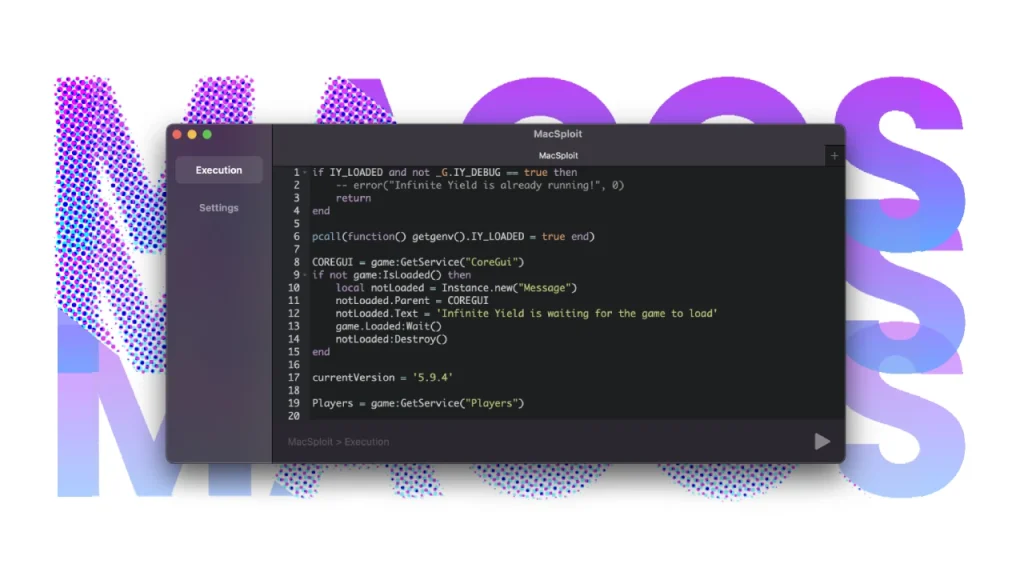
MacSploit Executor is a tool that runs Luau scripts inside a Roblox game on a Mac. In practice, that means you open Roblox, join a game, attach MacSploit to that game session, and then run a script — for example, an auto-farm script in Blox Fruits, a combat helper in Da Hood, or a script you wrote yourself to test an idea. The script only affects the session it is attached to, while that session is running.
Unlike the big Windows executors, MacSploit does not try to cover every platform. It covers one: macOS. That narrow scope is the point. The developers present it as a working Mac executor that is kept up to date whenever a Roblox client change breaks compatibility, rather than a general-purpose tool that happens to work on a Mac sometimes. The current release is v3.2.7, updated on October 15, 2026, and the installer is around 45 MB.
How Does MacSploit Work?
MacSploit works from outside the game, not from inside it. It runs as its own macOS application next to Roblox and talks to the game process from the outside, instead of digging deep into the game’s memory. The official site calls this an external workflow, and the practical benefit is stability: because the tool is not buried in the client, a problem with a script is far more likely to mean restarting Roblox than restarting your Mac.
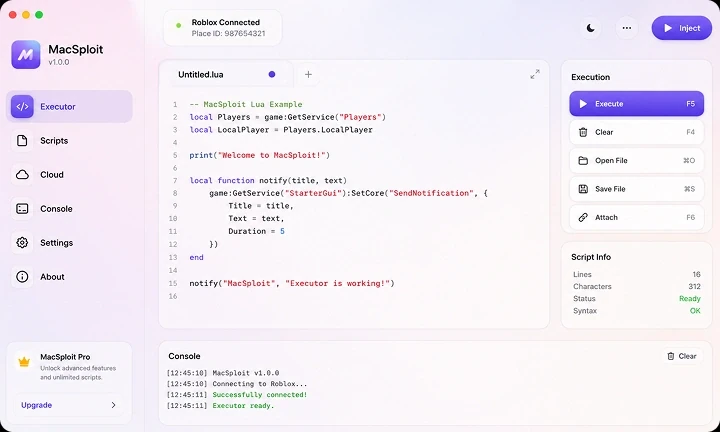
Day to day, the experience is deliberately simple. One window holds the script editor, the console output, and the attach control. You join a game, click attach, pick a script from the built-in hub or paste in your own, and run it. The site reports an average script load time of about 0.3 seconds, which matches the near-instant feel most users describe — a script’s interface or effects show up in the game almost straight away.
Who Is MacSploit For?
MacSploit is for anyone who plays Roblox on a Mac and wants to run scripts without leaving macOS. That includes competitive players farming in Da Hood or Blox Fruits, casual players trying out admin panels or roleplay scripts in Brookhaven, and developers who want to test their own Luau code against a live game. Setup is presented as a three-step, roughly two-minute job, with no terminal commands and no complicated configuration, so it suits beginners as well as experienced script users.
It is not for you if you mainly play on Windows, Android, or iOS — there is no build for those platforms. For Windows, look at Wave Executor or Solara Executor; for Android and iOS, see Arceus X Executor.
What’s New in v3.2.7?
The current build, v3.2.7 from October 15, 2026, is mainly a compatibility and polish release. According to the official site, it lines the tool up with the latest Roblox client, makes searching the script hub faster, and improves how reliably it attaches on macOS 15 Sequoia. Those are the kinds of changes that matter most for an executor: after a Roblox update, attachment is usually the first thing to break, and a quick fix for it is worth more than a long list of new features.
Features
- A workflow built for macOS from the ground up, running outside the Roblox process for a steadier session
- Completely free, with no subscription, no premium tier, and no hidden charges, and kept current with Roblox updates
- A built-in script hub holding more than 3,000 maintained scripts, searchable and runnable with a single click
- Strong coverage of the games Mac players actually play, including Da Hood, Blox Fruits, and Arsenal, with scripts the site says are tested and verified
- Very fast script loading, reported by the site at around 0.3 seconds on average
- A tidy, macOS-style interface with no clutter — editor, console, and controls in one compact window
- A three-step setup with no terminal work and no complex settings to learn first
- Built-in diagnostics that try to detect and sort out connection problems on their own, including the offline issue some users hit
Supported Games & Scripts
The script hub covers thousands of scripts, so the list below is only a sample of the most popular games highlighted on the official site — not a complete catalogue:
- Da Hood — combat and player-versus-player scripts, with more than 240 listed
- Blox Fruits — role-playing and auto-farm scripts, with more than 520 listed
- Pet Simulator X — auto-hatch and duplication-style scripts, with more than 180 listed
- Arsenal — aim and awareness scripts, with more than 310 listed
- Brookhaven — roleplay and trolling scripts, with more than 420 listed
- Natural Disaster — survival and god-mode scripts, with more than 95 listed
- Phantom Forces — first-person shooter and silent-aim scripts, with more than 275 listed
Script counts change as the hub is maintained, so treat these figures as the site’s snapshot, not a permanent total. Only run scripts from sources you trust, and test an unfamiliar script on an alternate account before using it on your main one.
How to Get MacSploit in Minutes
The setup itself has three steps:
- Go to the official site only. The only verified source is macsploit.net. Avoid mirrors, video-description links, and re-uploads on forums or file-sharing sites, which the official site warns may carry modified files.
- Download and open the installer. The package is around 45 MB. Follow the on-screen steps, and if macOS Gatekeeper asks you to allow the app, check System Settings under Privacy and Security — that prompt is normal for an app from outside the App Store, but only allow it once you are sure of the source.
- Launch and attach. Open Roblox, join a game and wait until your character is fully in the world, then open MacSploit and attach. Paste your script into the editor or choose one from the hub, then run it. The whole process, from download to first script, is presented as taking only a few minutes.
Latest Updates
MacSploit is updated regularly, and the official changelog highlights these recent releases. No other versions are claimed here:
| Version | Date | What changed (from the official site) |
|---|---|---|
| v3.2.7 (current) | October 2026 | Synced with the October 2026 Roblox client, faster script hub search and sync, and steadier attachment on macOS 15 Sequoia |
| v3.2.1 | June 2026 | Fixed the offline connection problem, improved injection speed, and added macOS 15 Sequoia compatibility |
| v3.2.0 | May 2026 | Overhauled the script hub to more than 3,000 entries, refreshed the macOS-native interface, and updated and verified Da Hood scripts |
Comparison: MacSploit vs Other Mac Options
Windows executors such as Hydrogen, Wave, and Solara are solid tools, but none of them runs natively on macOS — using one on a Mac would mean a virtual machine or a cloud PC, with extra lag and cost. The comparison below, based on the points made on the official MacSploit site, is about the options that actually work on a Mac:
| Feature | MacSploit | Coder Executor | AppleScript (native automation) |
|---|---|---|---|
| Free to use | Yes | Yes | Yes |
| Built natively for macOS | Yes | No | Yes |
| Works with Roblox | Yes | Yes | No |
| Script hub included | Yes | Yes | No |
| Updated regularly | Yes | Yes | Not applicable |
| Beginner friendly | Yes | Partly | No |
| External workflow | Yes | No | Not applicable |
| Community support | Yes | Yes | Limited |
The honest trade-offs, also stated on the official site, are that MacSploit is macOS only, that the Gatekeeper prompt can confuse first-time users, that the script hub needs an internet connection, and that updates can lag a few hours behind a Roblox patch.
Common Problems & Fixes
| Problem | Fix |
|---|---|
| MacSploit shows as offline | Check your internet connection, switch off any VPN, and make sure you have the latest build from macsploit.net. The built-in diagnostics can often spot the issue on their own; older builds can also carry expired sign-in tokens, so updating matters. |
| The app will not open on macOS | Open System Settings, go to Privacy and Security, scroll down, and allow MacSploit next to the blocked-app notice. This is the standard Gatekeeper step for apps from outside the App Store. |
| A script will not inject | Make sure Roblox is fully loaded and you are actually inside a game world before attaching — attaching too early is the most common cause. Wait for the world to render, then attach and try again. |
| Crashes on Apple Silicon | Use the latest build, which carries full support for M1, M2, M3, and M4 chips. Older builds may lack those optimisations. |
| A Roblox update broke attachment | Check macsploit.net for a matching update. The team typically patches compatibility within about a day of a Roblox client change. |
| Antivirus flags the app | Add MacSploit to your antivirus whitelist if you downloaded it from macsploit.net. Executors are often flagged on a heuristic basis because they interact with a game process, even when the build itself is clean. |
| The script hub will not load | Check your connection and restart MacSploit. The hub fetches its listings online, so it cannot show scripts without an active connection. |
| Injection feels slow | Close heavy applications to free up memory — the site suggests having at least 2 GB free — and confirm you are on the latest build. |
| The executor will not attach | Make sure only one Roblox window is running. Close any duplicate clients, relaunch the game, and attach again. |
FAQ
Q: Is MacSploit safe to use?
A: Nothing in this space is completely risk-free, and the honest answer has two parts. Technically, MacSploit’s outside-the-game approach means it does not rewrite Roblox files or dig deep into system memory, and the official site points to VirusTotal scans and a Google Safe Browsing report for its domain as checks you can run yourself. On the account side, though, using any executor breaks Roblox’s rules, so warnings or bans are always possible. Only download from macsploit.net, and consider testing on an alternate account first.
Q: Is MacSploit really free?
A: Yes. The official site is clear that there are no premium tiers, no subscriptions, and no hidden charges, and that every feature — including the full script hub — is available at no cost. Any page selling a “premium” version, a licence, or a paid Discord role for MacSploit is not the real thing.
Q: How do I use MacSploit executor?
A: Download the installer from macsploit.net, open it, then launch Roblox and join a game. Once you are in the world, open MacSploit, attach to the game, paste a script into the editor or pick one from the hub, and run it. From download to first script, the site presents the process as taking only a few minutes.
Q: How do I fix the MacSploit offline error?
A: Start with your connection: check that you are online and turn off any VPN, then restart MacSploit. If it still shows offline, download the latest build from macsploit.net — older builds can stop working when their sign-in tokens expire. The v3.2.1 update specifically addressed this offline problem, and the built-in diagnostics can also try to detect it automatically.
Q: Does MacSploit work on the latest macOS?
A: Yes. The official site lists support from macOS 12 Monterey through macOS 15 Sequoia, and each release is tested against the current macOS versions. If you are on a newer macOS than the latest MacSploit build was tested against, wait for a matching update before relying on it.
Q: Is MacSploit the best Mac executor for Roblox?
A: For Mac-only players, it is the strongest native option available: it is the only executor in this comparison built specifically for macOS with an external workflow, a large maintained script hub, and regular updates that track Roblox client changes. “Best” still comes with the usual caveats — it is macOS only, and account risk applies to every executor.
Q: Does MacSploit work on Apple Silicon (M1, M2, M3, M4)?
A: Yes. MacSploit is built as a universal binary that runs natively on Apple Silicon (M1 through M4) and on Intel Macs, without needing Rosetta translation. Older builds may lack full Apple Silicon support, so use the latest release.
Q: Where is the official MacSploit website?
A: The official site is macsploit.net, and it is the only verified source for the tool. Any other domain claiming to host MacSploit should be treated as unverified, and downloads from such domains should not be trusted.
Community Feedback & Rating
On the official site’s community section, Mac users rate MacSploit at 4.86 out of 5, based on 673 community ratings. The site presents a breakdown in which most ratings are four stars or higher, alongside written feedback from Mac players praising the fast injection, the script hub, and the native Mac feel, with some users noting the occasional need to wait for a patch after a Roblox update. Treat this as the community picture on the official site, not as an independent review score — it comes from macsploit.net itself, and this post does not present it as independently verified.
Rating
Rating: 4.86 (673 ratings)
So — Is MacSploit Safe?
The honest answer, without marketing, is that MacSploit is safer than many tools in this niche in how it is built, but not safe in the account sense. Because it runs as its own app next to Roblox rather than rewriting game files or deep system memory, the worst case for your Mac itself is usually just restarting Roblox. Because it touches a live game, antivirus tools may still flag it on a heuristic basis, which is a common false-positive pattern for external tools — the official site suggests checking the installer on VirusTotal (which runs it through many independent scanners) and checking Google’s Safe Browsing report for macsploit.net, both described by the site itself rather than verified independently here.
The bigger risk is fake downloads. Spot them with these checks, all based on the official site’s own guidance:
- Domain check. The real download comes only from macsploit.net. Look-alike domains are fakes.
- No key systems, ever. Official MacSploit is fully keyless. Any build asking you to complete offers, surveys, or “generate a key” is a monetised fake.
- File size check. The installer is about 45 MB. A tiny file is likely a dropper; a huge one is likely bundled with unwanted software.
- Nobody sells MacSploit. It is free. Premium listings, licences, and paid Discord roles are scams — report them and walk away.
- Verify before first launch. Run the installer through VirusTotal and check the Safe Browsing status of the domain you downloaded from, before you open it.
Final Verdict
MacSploit is the obvious first choice for anyone who plays Roblox only on a Mac. It is free, it has no key step, it feels like a proper Mac app, and its script hub covers the games Mac players actually play. The current v3.2.7 build is up to date with the October 2026 Roblox client, and its community rating on the official site — 4.86 out of 5 from 673 ratings — reflects a generally happy Mac user base.
The caveats are real but manageable: it works on macOS only, it needs an internet connection for the script hub, updates can trail a Roblox patch by a few hours, and, like every executor, it carries account risk. Download only from macsploit.net, keep it updated, and test unfamiliar scripts on an alternate account. On those terms, it is a strong, genuinely Mac-native executor — and for Mac players, there is no closer alternative.
Additional Details
- Description: MacSploit Executor is a Roblox script executor built specifically for macOS, using an external workflow and a built-in script hub.
- Price: Free ($0, no key system) — macsploit.net.
- Developer: Desmond Beasley — macsploit.net.
Leave a Reply