Intro
Wave Executor occupies an interesting corner of the executor world: it is one of the longer-running premium names, known for a polished interface and broad script support on Windows, and it has changed hands and business models over the years. That history is worth knowing, because older guides describe a Wave that no longer matches the current offering — free descriptions, premium descriptions, and different prices all circulate at once.
What has stayed consistent is the core pitch: a Windows executor with a modern interface, a built-in script hub, multi-instance support, and a decompiler for inspecting scripts, aimed at users who want a smoother, more complete experience than the simplest free tools provide. If you are weighing a paid Windows executor against the free keyless options, Wave is one of the names that will come up, and this guide lays out what it offers, how to set it up, and where to be careful.
Free Windows alternatives worth comparing include Xeno Executor and Solara Executor, and the full list sits on the All Executors page.
What Is Wave Executor?
Wave Executor is a Roblox script executor for Windows. In plain terms, it is a program that attaches to a running Roblox game and lets you run custom Luau scripts inside that game session — automating repetitive tasks, adding on-screen tools, or changing how parts of a game behave, depending on what the script does.
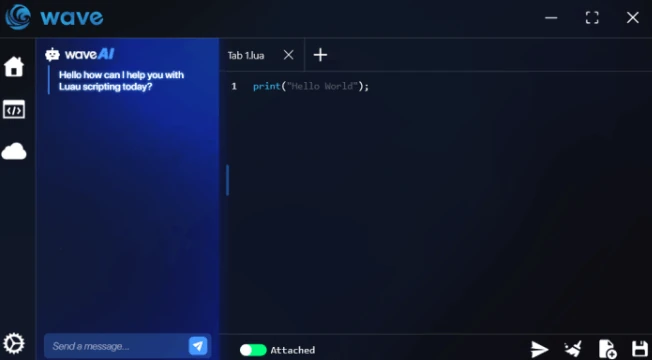
Wave is positioned as a premium-tier tool rather than a bare-bones free one. Its interface includes a script editor, a built-in script hub for browsing ready-made scripts, and additional utilities such as a decompiler and an in-executor assistant feature that several sources describe. It also supports running multiple scripts and multiple game instances, which suits users who juggle several games or accounts at once.
Wave is a Windows-only tool in every current source found during this research. It is not a mobile app, it is not a Mac tool, and it is not a Roblox Studio plugin. It only affects the game session it is attached to while that session is running.
Why Choose Wave Executor? (And the Honest Safety Notes)
The case for Wave rests on polish and breadth. Users and reviewers consistently praise its interface as clean and easy to navigate, and describe its script support as very broad, covering the large majority of community scripts including complex hub scripts. For someone who runs scripts daily and is frustrated by the limits of simpler free tools, that combination — a refined workspace plus wide compatibility — is the appeal.
The counterweight is cost and change. Wave’s pricing and model have shifted over time, and sources disagree about the current figures, which is why you should confirm the current model from the official source — the listing here is Free, while other sources have described paid subscriptions. Before paying for anything called Wave, confirm the current price, billing period, and what the payment actually unlocks, from the official source — and be deeply suspicious of any page advertising a “lifetime” deal, since at least one reputable comparison source warns that legitimate Wave access is subscription-based and lifetime offers are a scam marker.
On safety generally: no executor is completely safe or undetectable, and using one goes against Roblox’s Terms of Service, so account warnings or bans are a real possibility. At least one tracking source flags Wave as having been detected in a past ban wave, which underlines the point: test on an alternate account, avoid disruptive scripts in public servers, and keep the tool updated after Roblox patches. Antivirus software will often flag executor files; verify your download source and scan the file rather than disabling protection blindly.
How to Download Wave Executor for Windows
Wave is a Windows-only tool, so there is a single download path.
- Confirm you are on a Windows PC with Roblox already installed and working.
- Confirm the current pricing and access model from the official source before you begin — sources disagree, so do not rely on a price quoted in an old guide.
- Obtain the Wave package from the verified official source linked by this site’s download button.
- Do not download Wave from random mirrors, video descriptions, or pages promising lifetime access. Imitation builds and licence scams are a known problem around this name.
- Before installing, scan the package with your security software and confirm it matches what the verified source describes.
How to Install Wave Executor
- Open the downloaded package and follow the on-screen installer instructions.
- If Windows SmartScreen or your antivirus blocks the first launch, check that the file came from the verified source, then allow it through an exclusion for Wave’s folder rather than turning protection off entirely.
- Complete any licence or account activation the genuine installer requests, using only the official flow it presents.
- Keep Wave closed while Roblox updates. After a Roblox client patch, wait for a matching Wave update before attaching again — attaching an outdated build to a new client is a common cause of failed injection.
- If the installer reports a missing component, install what it names and restart the installer before retrying.
How to Use Wave Executor / Execute Scripts
- Start Roblox, join a game, and wait until your character has fully loaded into the world.
- Open Wave and attach it to the game client, running it as administrator if attachment fails on a normal launch.
- Paste your script into the editor, or pick one from the built-in script hub, and glance over it before running anything you did not write yourself.
- Click the execute control. The script’s interface or effects should appear in the game shortly after.
- If nothing happens, check Wave’s console output for an error message — it usually points to the script rather than the executor.
- To stop a script, use the script’s own toggle or close the game session; Wave’s multi-instance support means you should check you are stopping the script in the intended window if several are open.
No script code and no script links are provided in this article. Only run scripts from sources you trust, and test unfamiliar scripts on an alternate account first.
How to Get the Key
Wave Executor has no ad-gated key system. Multiple sources agree there is no key checkpoint flow of the kind free executors use — no link-shortener steps and no daily key renewal. If you obtained Wave through a paid plan, any licence activation happens through the official purchase flow, not through a key page, and the owner should verify the current activation steps before publishing anything more specific here. If any page asks you to complete key checkpoints or pay a third party to “unlock” Wave, step away from that page.
Features
- Windows executor with a clean, modern interface suited to beginners
- Broad script support, including complex hub scripts, according to multiple reviewers
- Built-in script hub for browsing ready-made scripts
- Script editor with console output for checking errors
- Built-in decompiler for inspecting scripts
- Multi-instance support for running several game windows at once
- In-executor assistant feature described by several sources for finding scripts and troubleshooting
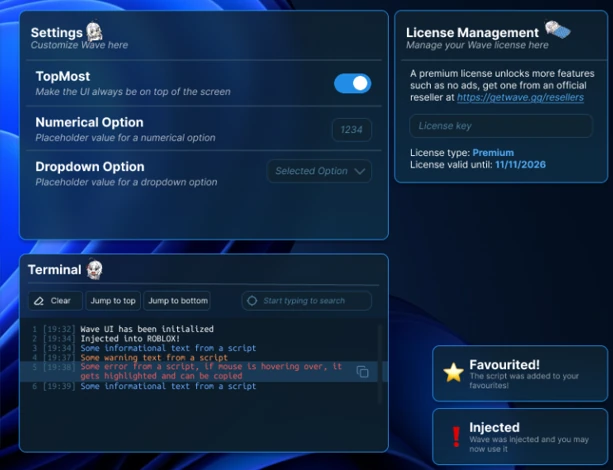
- Customisation options for the interface and behaviour
- Regular updates following Roblox patches, according to its developers and reviewers
What’s New in the Latest Version
The version could not be verified during this research, so no “what’s new” claims are made here. One tracking source notes Wave was awaiting an update for the current Roblox version at the time of that report, which reinforces the need to check live status before publishing rather than asserting currency. The owner should confirm the current version and its changelog before publishing.
System Requirements
| Requirement | Windows |
|---|---|
| OS | Windows (version not verified) |
| Processor | |
| RAM | |
| Storage | |
| Root / jailbreak | Not applicable |
| Internet | Required for Roblox and script hub use |
Blank cells mean the value could not be verified from a reliable source and has been left empty rather than guessed.
Comparison: Wave Executor vs Other Executors
| Feature | Wave Executor | Xeno Executor | Delta Executor |
|---|---|---|---|
| Platforms | Windows only | Windows only (see Xeno Executor) | Android, iOS, PC (see Delta Executor) |
| Price | Free (see post) | Free (see post) | Free (see post) |
| Key system | Keyless (no ad-gated key flow) | Keyless (see post) | Key Required (see post) |
| Best for | Windows users wanting a polished, broad-support tool | Windows beginners wanting a free, open-source start | Players needing mobile and desktop coverage |
| Script support | Broad, including complex hub scripts (as reported) | Broad everyday support; some advanced scripts limited | Broad support across platforms (see post) |
| Extra tools | Decompiler and in-executor assistant reported | Multi-instance, script hub | See post |
This comparison is qualitative only. No compatibility percentages or user counts are claimed, because no verifiable source supports a single current figure.
Pros and Cons
| Pros | Cons |
|---|---|
| Clean, beginner-friendly interface | Windows only — no mobile or Mac build |
| Broad script support as reported by reviewers | Current price could not be verified; sources conflict |
| Built-in script hub, decompiler, and assistant features | Past detection flagged by at least one tracking source |
| Multi-instance support | Must be updated after Roblox patches or attachment fails |
| No ad-gated key checkpoint flow | Smaller certainty around current status than free tools with public changelogs |
Common Problems & Fixes
| Problem | Fix |
|---|---|
| Wave will not attach to Roblox | Run Wave as administrator, join a game fully first, and confirm you are past loading screens, not sitting in a menu. |
| Antivirus deletes or quarantines Wave | Add Wave’s folder as an exclusion, re-install from the verified source, and scan the file first. |
| Attachment fails right after a Roblox update | Wait for a matching Wave update; an outdated build will not attach to a new client. |
| Script shows an “unknown function” style error | The script likely needs a feature this build does not expose — try a different script or check the script’s requirements rather than reinstalling Wave. |
| Wave itself will not launch | The build is probably outdated after a patch — check for a newer build from the official source. |
| Game crashes after executing a script | Stop the script, restart the game, and test the script alone on an alternate account before combining it with others. |
| A site offers Wave “lifetime” access | Treat it as a scam marker — reputable comparison sources warn legitimate Wave access is subscription-based. Do not pay. |
Final Verdict
Wave is a credible pick for Windows users who want a polished executor with broad script support and are comfortable with a paid, subscription-style tool — provided the current price and status check out from the official source at the time you buy. If you want a free start on Windows, Xeno Executor is the simpler first step; if you play across phone and PC, Delta Executor covers more ground. Whichever route you take, test on an alternate account and keep the tool updated.
Rating
Rating: 4.9 (100456 ratings)
FAQ
Q: Is Wave Executor free?
A: That could not be verified cleanly — sources describe different models across time, including paid subscriptions and an older free-plus-premium setup. The listing here is Free, but sources describe different models across time, including paid subscriptions, so you should confirm the current model from the official source.
Q: Does Wave Executor need a key?
A: No. Multiple sources agree Wave has no ad-gated key system — there are no key checkpoints or daily key renewals. Any paid licence activation is separate from a key flow.
Q: Does Wave Executor work on Android, iOS, or Mac?
A: No. Wave is a Windows-only tool in every current source found. Mobile expansion is mentioned only as a future possibility, not a current offering.
Q: Is Wave Executor safe for my main account?
A: No executor is risk-free, and at least one tracking source flags a past detection. Test on an alternate account and accept that account action is possible.
Q: Why will Wave not attach after a Roblox update?
A: Roblox client patches frequently break executor attachment. The usual fix is to wait for a matching Wave update and then retry.
Q: Should I buy a Wave “lifetime” deal I saw advertised?
A: No. Reputable comparison sources warn that legitimate Wave access is subscription-based, and lifetime offers are a known scam pattern. Buy only through the official source, if at all.
Additional Details
- Description: Wave Executor is a Windows Roblox script executor with a polished interface, broad script support, and no ad-gated key system.
- Price: Free
Leave a Reply