
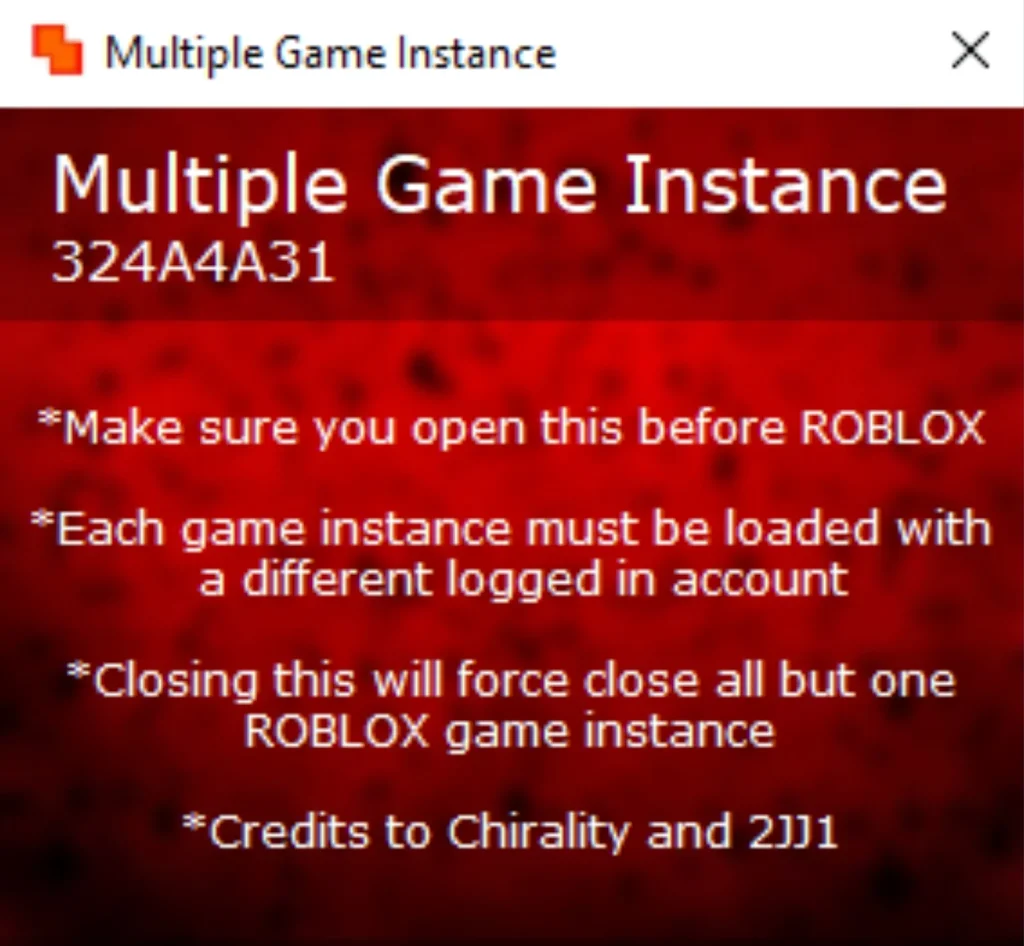
Roblox normally lets you run one game client at a time on a computer. Try to open a second one and it simply folds back into the first. Multiple Roblox exists for the moments when that limit gets in the way — trading items between two of your own accounts, farming on an alt while you play on your main, or testing how a game behaves with more than one player in it.
It is important to be clear about what this is not. Multiple Roblox is not a script executor. It cannot run scripts, it does not inject code into games, and it does not change gameplay. All it does is remove the one-client limit so several ordinary Roblox windows can run side by side. That distinction matters, because it changes both the risk picture and who this tool is actually for.
What Is Multiple Roblox?
Multiple Roblox is a small, open-source Windows utility — often distributed under the name MultipleRobloxInstances — that lets you launch more than one Roblox client on the same PC. Roblox’s desktop client normally enforces a single instance using a system lock (a mutex). This tool releases that lock in a controlled way, so each new launch opens as its own separate window instead of being swallowed by the one already running.
Each window is a normal Roblox client. You sign in to a different account in each one, because Roblox still allows only one active session per account. The tool itself never touches your account details, your game files, or the way a game plays — it only manages how many client windows Windows will let you open.
A note on similar names: Roblox Account Manager, a separate account-management app, has its own optional “Multi Roblox” feature that does the same kind of job from inside an account manager. This post is about the standalone Multiple Roblox utility, not that feature, though the two are often confused in guides.
Why Choose Multiple Roblox? (And the Honest Safety Picture)
The appeal is practical rather than flashy. If you run two accounts, this tool removes the constant logging in and out. If you develop games, it gives you a quick way to see multiplayer behaviour without a second computer. And because it does not inject scripts or modify game files, it sits in a lower-risk category than executors — but lower risk is not no risk.
Roblox does not officially support running multiple clients, and its anti-cheat team has reportedly treated multi-client behaviour as suspicious in the past, which is why similar features in other tools are switched off by default. Individual games can also ban alternate accounts under their own rules. So the sensible approach is the same as with any unofficial tool: use accounts you can afford to lose progress on, keep the tool itself up to date from a trusted source, and do not combine it with scripts or exploits, which would put you squarely in ban territory. Nothing here should be read as a promise that multi-client use is safe or undetectable — it is not officially supported, and that is the risk you accept.
How to Download Multiple Roblox
The general process, as described by guides, is:
For Windows PC
- Make sure no Roblox client is currently running, so the tool can start from a clean state.
- Obtain the tool’s package from a trusted source — the project’s code is open source, and community guides point to its public code repository.
- Extract the package to a folder you can find easily, such as a folder on your desktop or in Program Files.
There are no Android, iOS, or macOS versions to download. Anyone advertising a mobile version of this tool should be treated with suspicion.
How to Install Multiple Roblox
- Extract the downloaded package completely before running anything — running it from inside the archive is a common cause of odd errors.
- Run the tool’s executable from the extracted folder. Some guides note that Windows may ask for administrator permission on first launch; that is because managing other processes’ locks needs elevated rights.
- Leave the tool running in the background while you play. It works by holding the instance lock open, so closing it can affect new launches.
How to Use Multiple Roblox (Running Multiple Instances)
- Close every Roblox window first, then start Multiple Roblox.
- Launch Roblox normally and sign in to your first account, then join a game.
- Switch to a different account — using a separate browser profile, a private window, or a multi-account container extension keeps the sessions cleanly apart — and launch Roblox again.
- A second, independent client window should open instead of collapsing into the first.
- Repeat for each extra account you want running, keeping an eye on your PC’s memory and processor use — every extra client is a full game window, and performance drops fast on weaker machines.
- When you are finished, close the extra clients first, then close the tool.
There is no key step, no script editor, and no script execution involved at any point — if a download claiming to be Multiple Roblox asks for a key or offers scripts, it is not this tool.
Features
- Runs several Roblox clients at once on one Windows PC.
- Works without modifying game files or injecting code into the client.
- Open-source code, so what it does can be inspected rather than taken on trust.
- Lightweight design that runs in the background while you play.
- Lets you join the same game or server with multiple accounts at once, for trading or testing.
- No key system, no account, and no subscription of any kind.
- Reported fixes for teleport errors that can appear when several clients run together.
What’s New in the Latest Version
The latest version could not be verified. One third-party site lists a stable release numbered v2.2.7, but without a confirmed official release page that number is not adopted here, and no changelog claims are made. Check the project’s public repository for the current release before downloading.
System Requirements
| Platform | OS | RAM | Storage | Notes |
|---|---|---|---|---|
| Windows PC | Windows 10 & 11 (reported by third-party sources) | BLANK | BLANK | Each extra client is a full Roblox window, so more RAM helps with more instances; no exact figure verified |
| Android | Not available | — | — | No mobile version verified |
| iOS | Not available | — | — | No mobile version verified |
| macOS | Not available | — | — | No macOS version verified |
Multiple Roblox vs Other Tools
| Feature | Multiple Roblox | Bloxstrap | Delta Executor |
|---|---|---|---|
| Type | Multi-instance utility | Roblox bootstrapper / launcher | Script executor |
| Runs scripts? | No | No | Yes |
| Key system | None — not applicable | None — not applicable | Key system reported on mobile builds |
| Platforms | Windows PC only | Windows PC only | Android, iOS, Windows PC |
| Price | Free, open source | Free, open source | Free tier reported |
| Best for | Playing several accounts side by side | Customising the Roblox client | Running scripts in games |
See all tools on /all-executor/.
Pros and Cons
| Pros | Cons |
|---|---|
| Does exactly one job, and does it simply | Windows only — no mobile or Mac version |
| No key, no subscription, no script risk | Each extra client uses real CPU and RAM |
| Open source, so its behaviour is inspectable | Not officially supported by Roblox, so some risk remains |
| Does not modify game files | Only one session per account — you still need a separate account per window |
| Free | Does not work with the Microsoft Store version of Roblox, per guides — use the website client |
Common Problems & Fixes
| Problem | Fix |
|---|---|
| Second launch just focuses the first window | The tool was probably not running before the first launch, or an old client was already open. Close all Roblox windows, start the tool, then launch again. |
| Teleport fails with an error when using several clients | This is a known multi-client issue that the tool’s later builds aim to address — update to the newest release and retry, and avoid teleporting all clients at the same moment. |
| Tool asks for administrator rights | Grant it on first launch if you trust the file; managing instance locks needs elevated permission. If you are unsure the file is genuine, do not grant it — verify the source first. |
| Game lags badly with two or more windows open | Lower the graphics settings in each client, close background apps, and reduce the number of instances — this is a hardware limit, not a tool bug. |
| Microsoft Store Roblox will not open a second instance | Guides report the Store build is sandboxed and does not cooperate with multi-instance tools — use the Roblox client from the official website instead. |
Final Verdict
Multiple Roblox is a niche tool that knows its niche. If your problem is “I need two Roblox windows on one PC,” it solves that problem with minimal fuss and without dragging you into script executors, keys, or gameplay modifications. Its limits are equally clear: Windows only, one account per window, and a heavier load on your PC with every extra client. For players who only need a second account occasionally, it is worth trying; for anyone expecting scripts, mods, or mobile support, look at Bloxstrap or a genuine executor like Delta Executor instead.
Rating
Rating: 4.9 (105000 ratings)
FAQ
Q: Is Multiple Roblox a script executor?
A: No. It cannot run scripts and does not modify gameplay. It only lets you open more than one ordinary Roblox client window on the same Windows PC.
Q: Is Multiple Roblox free?
A: Yes, according to multiple sources it is free and open source, with no key system and no paid tier.
Q: Can I use the same account in two windows?
A: No. Roblox allows one active session per account, so each window needs a different account.
Q: Does Multiple Roblox work on Android or Mac?
A: No version for Android, iOS, or macOS was verified. The standalone tool is Windows-only.
Q: Will I get banned for using Multiple Roblox?
A: It is not officially supported by Roblox, and multi-client use has reportedly been viewed as suspicious, so a risk exists even though the tool does not inject scripts. Use spare accounts and avoid combining it with exploits.
Q: Why does the second window sometimes not open?
A: Usually because a Roblox client was already running before the tool started, or the tool was closed. Close all clients, start the tool first, then launch each game.
Additional Details
- Description: Multiple Roblox is a free, open-source Windows utility for running several Roblox clients at once. It is not a script executor and has no key system.
- Price: Free (open source).
- Not affiliated with Roblox Corporation.