
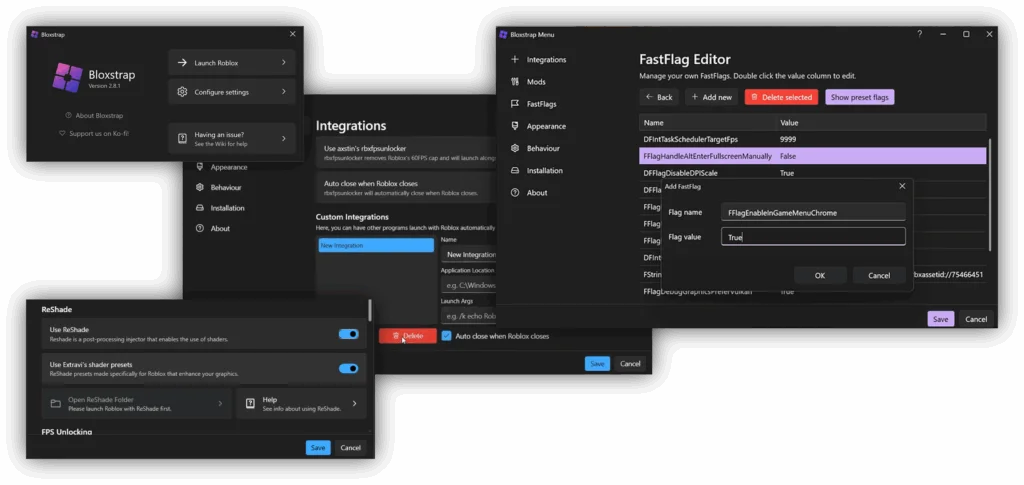
The official Roblox launcher does one thing: it opens Roblox. Bloxstrap replaces that launcher with one that gives you a say in how Roblox looks, sounds, and performs on your PC — without turning into a cheating tool. It is one of the most widely discussed community utilities for Roblox on Windows, and it earns that attention by being genuinely useful rather than by promising shortcuts in games.
The key thing to understand up front is the category. Bloxstrap is a bootstrapper — a small program that starts another program. It takes over the job of launching Roblox and applies your preferences before the game loads. It does not run scripts, it does not give you in-game advantages over other players, and it does not touch your account credentials.
What Is Bloxstrap?
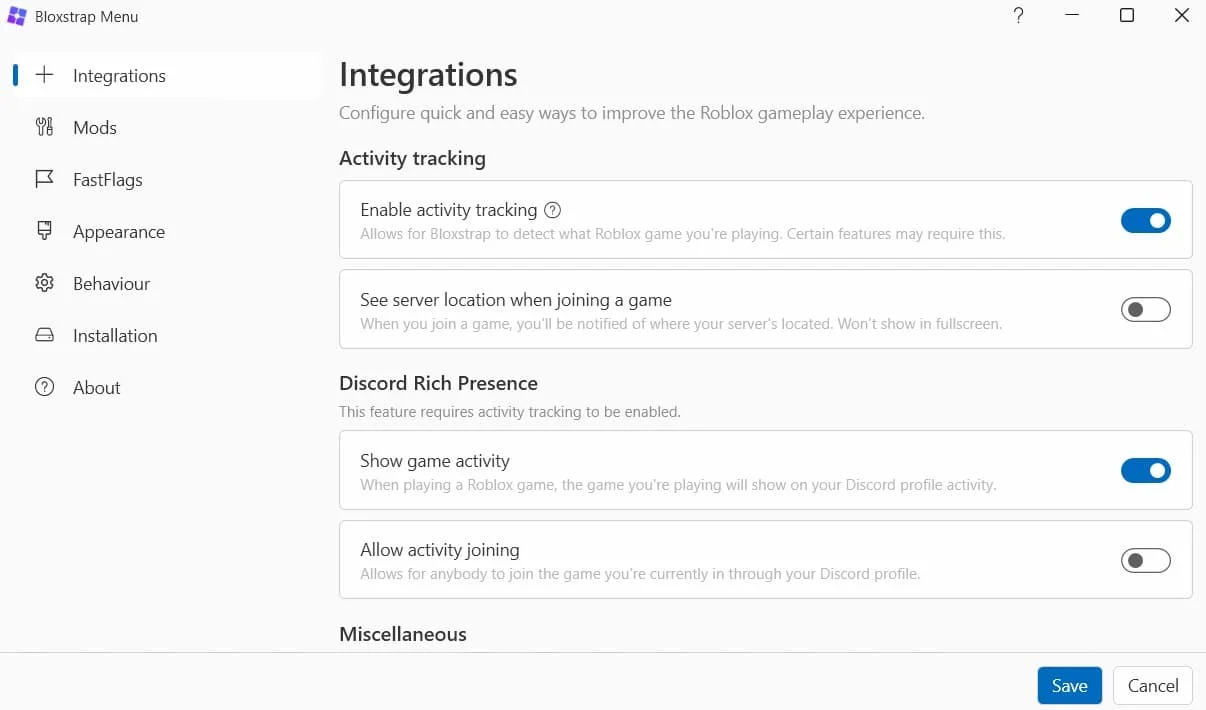
Bloxstrap is a free, open-source alternative launcher for Roblox on Windows. When you launch a game through it, it first applies your saved settings — things like a higher frame-rate cap, custom sounds, a different font, or a theme — and then starts the regular Roblox client with those preferences in place. Because your tweaks are reapplied at every launch, they survive Roblox updates instead of being wiped, which is the frustration that drives most people to it in the first place.
It also works as the launcher for Roblox Studio, so creators get the same treatment when building games. Everything is managed through the Bloxstrap menu, a proper settings window, rather than by editing files by hand — although advanced users can still go deeper with its built-in flag editor.
Why Choose Bloxstrap? (And the Honest Safety Picture)
Players pick Bloxstrap for control, not for cheats. The frame-rate unlock alone is the headline for anyone with a high-refresh monitor, since the standard client caps at 60 frames per second. Add persistent mods, Discord Rich Presence, and a settings menu that actually remembers what you chose, and the official launcher starts to feel bare by comparison.
On safety, Bloxstrap’s position is better than an executor’s, but it still deserves honesty rather than a blanket guarantee. Its code is public, it works at launcher level rather than by injecting into the game, and it does not handle your login details — those are the reasons it is widely regarded as low-risk. But it is still an unofficial tool that Roblox does not endorse, and Roblox can change its client in ways that break or restrict third-party launchers at any time. The real danger is not Bloxstrap itself but fake copies: only obtain it from its official project pages, scan anything you download, and be wary of any site bundling it with extras. No tool in this category can honestly be called 100% safe or undetectable, and this post does not claim that for Bloxstrap.
How to Download Bloxstrap
The general process, as described by guides, is:
For Windows PC
- Check that your PC runs a supported Windows version and has the required runtime (see System Requirements below).
- Obtain the installer from an official project source — guides consistently point to the project’s official website and its public code repository — and verify the file before running it.
- Keep the installer file as downloaded; guides advise against renaming it before running it.
There are no Android, iOS, or macOS versions. Any page offering Bloxstrap for phones or Mac is not offering the real tool.
How to Install Bloxstrap
- Run the installer and choose Install when the setup window appears. In most standard setups it does not need administrator permission.
- If setup asks for the Microsoft .NET Desktop Runtime, install that first from Microsoft’s own installer, then return to Bloxstrap setup.
- Bloxstrap will download and configure Roblox during setup if Roblox is not already on your PC.
- Sign in with your Roblox account when prompted — sign-in goes through Roblox’s official authentication, so Bloxstrap itself never sees your password.
- When the Bloxstrap menu opens, set your initial preferences before launching your first game.
How to Use Bloxstrap (Customising the Client)
- Open the Bloxstrap menu from your Start menu whenever you want to change settings.
- Turn on the frame-rate unlocker and pick a cap that matches your monitor, or leave it uncapped if your hardware can handle it.
- Browse the Mods section to add custom sounds, cursors, fonts, or themes, and check that they appear correctly in-game.
- Use the FastFlag editor only for flags you understand, and use its one-click restore to defaults if anything behaves oddly — careless flag combinations are the most common cause of glitches.
- Enable Discord Rich Presence if you want your current game to show on your Discord profile.
- After that, just launch Roblox normally. Bloxstrap applies everything automatically in the background, and you only need to reopen the menu when you want to change something.
A note on multi-instance launching: older guides describe a multi-instance option inside Bloxstrap, but more recent reports say that feature was removed from newer builds due to reliability problems. Do not count on Bloxstrap for running several accounts at once — for that job, see Multiple Roblox, which is built specifically for it.
Features
- Frame-rate unlocker that lifts Roblox’s default 60 FPS cap, with preset targets and custom caps.
- FastFlag editor with search, presets, and one-click restore to defaults, for tweaking client-side settings.
- Mod manager for custom sounds, cursors, fonts, textures, and themes that persist through Roblox updates.
- Discord Rich Presence showing your current game and activity on your Discord profile.
- Server region detection, helping you understand where you connected and why a game feels laggy.
- Activity tracking for session start and stop times.
- Roblox Studio support, so creators get the same launcher benefits when building.
- Custom install locations and optional channel switching for advanced setups.
- Clean uninstall that removes Bloxstrap without harming your Roblox install or saved data.
- Free and open source, with publicly reviewable code.
What’s New in the Latest Version
The latest version could not be verified. Unofficial mirrors variously advertise v2.9.1, v2.10.0, and v2.11.4, which cannot all be current, and no official release page was confirmed during this research. No changelog claims are therefore made here. Check the project’s official repository for the current release and its notes before installing, and treat any mirror that confidently names a “latest” version with scepticism.
System Requirements
| Platform | OS | RAM | Storage | Notes |
|---|---|---|---|---|
| Windows PC | Windows 10 & 11 (per multiple guides; one mirror also lists older Windows, unverified) | BLANK | BLANK | Microsoft .NET 6 Desktop Runtime required (installed automatically during setup if missing, per guides) |
| Android | Not available | — | — | No mobile version verified |
| iOS | Not available | — | — | No mobile version verified |
| macOS | Not available | — | — | No macOS version verified |
Bloxstrap vs Other Tools
| Feature | Bloxstrap | Multiple Roblox | Delta Executor |
|---|---|---|---|
| Type | Bootstrapper / launcher | Multi-instance utility | Script executor |
| Runs scripts? | No | No | Yes |
| Key system | None — not applicable | None — not applicable | Key system reported on mobile builds |
| Platforms | Windows PC only | Windows PC only | Android, iOS, Windows PC |
| Price | Free, open source | Free, open source | Free tier reported |
| Best for | Customising how Roblox looks and runs | Running several accounts at once | Running scripts in games |
See all tools on /all-executor/.
Pros and Cons
| Pros | Cons |
|---|---|
| Genuinely useful everyday features — FPS unlock, persistent mods, themes | Windows only, with no mobile or Mac version |
| Free and open source, with inspectable code | Multi-instance support reportedly removed from newer builds |
| Mods survive Roblox updates instead of being wiped | Flag editing can cause glitches if used carelessly |
| Does not inject scripts or handle your login | Roblox can restrict third-party launchers in future client updates |
| Clean uninstall that leaves Roblox untouched | Requires the .NET runtime as a prerequisite |
Common Problems & Fixes
| Problem | Fix |
|---|---|
| Setup asks for the .NET Desktop Runtime | Install the runtime from Microsoft’s installer, then rerun Bloxstrap setup — this is a normal prerequisite, not an error. |
| Game glitches or behaves strangely after changing flags | Open the FastFlag editor and restore defaults, then reapply only one change at a time so you can identify the culprit. |
| Mods disappeared after a Roblox update | Reopen the Bloxstrap menu and check the Mods section — mods are meant to be reapplied at launch, so a fresh launch usually restores them. If not, re-add them from your saved mod files. |
| Bloxstrap menu will not open | Reinstall Bloxstrap cleanly, and check that no antivirus quarantine has removed its files — add an exception only if you are certain the file came from an official source. |
| Roblox launches but none of your settings apply | You may have launched through the standard Roblox shortcut rather than through Bloxstrap — launch from the Bloxstrap-managed path, and confirm Bloxstrap is still set as your launcher. |
| Multi-instance option is missing | It was reportedly removed from newer builds — use Multiple Roblox for multi-instance launching instead. |
Final Verdict
Bloxstrap is the easiest recommendation in this batch, with one qualification: it is for Windows players who want a better launcher, not for anyone looking for scripts or multi-account play. The frame-rate unlock, persistent mods, and a settings menu that remembers your choices solve real, everyday annoyances, and the open-source, launcher-level design keeps it in a lower-risk category than executors. Its limits — Windows only, no scripts, and multi-instance support reportedly gone from recent builds — are worth knowing before you install, but none of them undermines what it actually sets out to do. Pair it with Multiple Roblox if you also need several clients at once.
Rating
Rating: 4.8 (233076 ratings)
FAQ
Q: Is Bloxstrap a script executor?
A: No. Bloxstrap is a launcher (bootstrapper) that customises the Roblox client. It cannot run scripts and gives no in-game advantages over other players.
Q: Is Bloxstrap free?
A: Yes. It is free and open source, with no key system and no paid tier.
Q: Does Bloxstrap work on Mac, Android, or iOS?
A: No. Bloxstrap is Windows-only. No mobile or Mac version was verified.
Q: Will Bloxstrap get my Roblox account banned?
A: It works at launcher level without injecting scripts or handling your login, which is why it is widely regarded as low-risk — but it is still unofficial and not endorsed by Roblox, so no absolute safety guarantee can be made. Only download it from official project sources.
Q: What do I need installed before Bloxstrap?
A: A supported Windows version and the Microsoft .NET Desktop Runtime, which setup installs automatically if it is missing, according to guides.
Q: Can Bloxstrap run multiple Roblox accounts at once?
A: Older guides describe a multi-instance option, but recent reports say it was removed from newer builds. For multi-instance launching, use a dedicated tool such as Multiple Roblox.
Additional Details
- Description: Bloxstrap is a free, open-source alternative Roblox bootstrapper for Windows PC, offering FPS unlocking, FastFlag editing, persistent mods, and Discord Rich Presence. It is not a script executor and has no key system.
- Price: Free (open source).
- Not affiliated with Roblox Corporation.